
CloudStream is a free, open-source media app for Android. It plays video, keeps bookmarks, and supports Chromecast. It ships with no content. Everything you watch comes from an extension you install yourself, and that is the part that decides whether the app is useful or a waste of time.
This guide covers what CloudStream does, how to install it safely, and how to think about extensions. It does not list sources for copyrighted media.
What CloudStream is
- An extension-based media player, not a content library.
- Free and open source under GPL-3.0, written in Kotlin.
- No ads and no analytics in the app itself.
- Phone and Android TV support, Chromecast, bookmarks, and tracking support.
- Android 6.0 or newer. It is not on the Play Store.
The project describes itself as a media center for videos from sources such as YouTube, Twitch, publicly available IPTV channels, and audio books. Extensions can add much more than that, which is exactly why you should understand where they come from.
What it is not
- It is not a streaming service. There is no catalogue, no account, and no subscription.
- It does not host video. Playback depends on the extension and the source behind it.
- It is not guaranteed to work. Extensions break when the site they read changes.
- It is not a license to watch copyrighted media. The project asks people not to create or use extensions that host copyrighted content.
The trust boundary
An extension is code that runs inside the app. It can make network requests, read the page it is pointed at, and pass a stream back to the player. Installing a repository means trusting whoever maintains it.
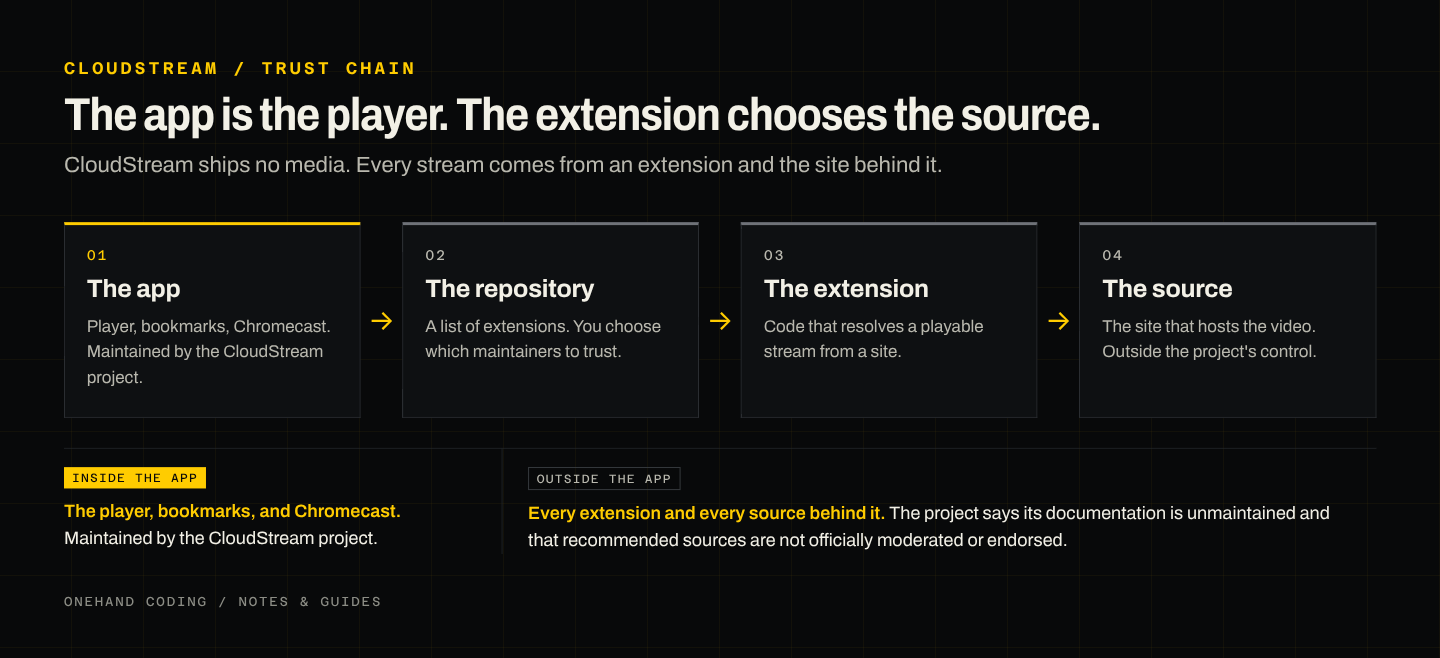
The official docs list repositories, but the project says that documentation is unmaintained and that recommended sources are not officially moderated or endorsed. Treat any list, including the official one, as a starting point rather than a safety guarantee.
Install CloudStream
- Open the official releases page at github.com/recloudstream/cloudstream/releases.
- Download the APK for the current stable release. A pre-release is also published; stable is the safer default.
- Open the file. Android will ask which app may install unknown apps. Allow it for the browser or file manager you used.
- Install and open CloudStream.
Only download from the official GitHub organization. An APK from a search result or a random site is a security risk.
Add the official repository
CloudStream needs at least one repository before it can show anything.
- Open Settings, then Extensions.
- Add the official providers repository. The shortcode is
cspr 0094. - If the shortcode does not work, paste the repository URL directly:
https://raw.githubusercontent.com/recloudstream/extensions/master/repo.json. - Open the repository, install the extensions you want, and go back to the home screen.
If the list is empty, the repository failed to load. Check your connection and try again before adding another repository.
Use it
- Search: use the search tab. Results depend on the extensions you installed.
- Bookmarks: save a title and pick it up later.
- Tracking: connect a supported tracker if you want your watch history in one place.
- Chromecast: cast from the player to a TV on the same network.
- Android TV: the project documents a TV setup if you use a set-top box or a TV with Android.
When it breaks
- No results: the extension is down or the repository is stale. Update the repository and the extension.
- A stream will not play: try another source inside the same extension. Sources fail independently.
- The app crashes on open: update to the latest release, or clear the app cache.
- Playback stops in the background: exempt CloudStream from battery optimization.
Legality and safety
- CloudStream itself ships no media. What you watch comes from third-party extensions and sources.
- Availability and legality vary by country. You are responsible for what you use.
- Copyright holders can send takedown requests, and the project says it does not moderate or endorse third-party sources.
- Only install repositories you trust. An extension can see the traffic it handles.
- If a repository asks for an account, payment, or unusual permissions, stop and check why.
The short version
Install the official APK, add the official repository, and install only the extensions you actually need. Treat every extension as code from a stranger. Update when playback breaks, and do not expect CloudStream to be a content service. It is a player, and you choose what it plays.